Request Scheduling
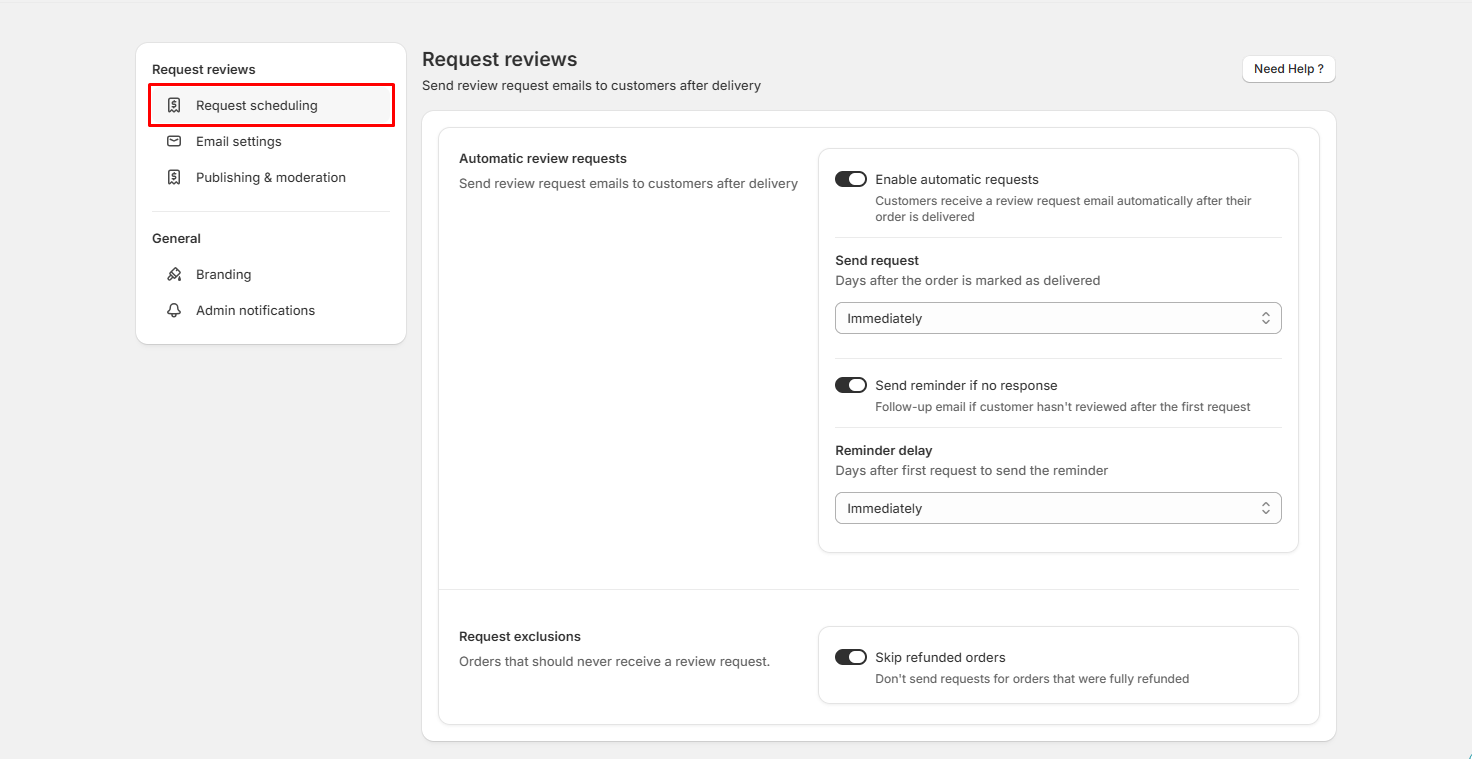
The Request Scheduling page is a core component of the review app, designed to automate and fine-tune how and when review invitation emails are dispatched to your customers after delivery. Proper configuration here maximizes customer response rates and ensures seamless post-purchase automation.
Automatic Review Requests Configuration
- Enable automatic requests: Master toggle that activates automated review collection. When turned on, customers automatically receive a review request email after their order is marked as delivered.
- Send request (Timing): Dropdown menu that controls the delivery delay. You can choose to send the email Immediately upon order delivery or set a customized waiting period (e.g., a specific number of days) to give customers time to use the product first.
- Send reminder if no response: Secondary toggle that enables automated follow-up emails. If a customer ignores or forgets to complete the initial review request, a reminder email is triggered.
- Reminder delay: Configures the waiting interval between the first review request and the follow-up reminder email (e.g., set to Immediately or a defined number of days after the initial request).
Request Exclusions Settings
- Skip refunded orders: Safety toggle that prevents review requests from being sent for orders that were fully refunded. This ensures you do not inadvertently ask dissatisfied customers who received refunds to review their purchase, protecting your store's brand reputation.