Reviews Management Dashboard
The Reviews Management Page serves as a central hub for viewing, moderating, and organizing all customer feedback submitted to your store. It allows merchants to control which reviews appear on the storefront, export review data, filter entries by status or rating, and respond directly to customers to build trust and maintain brand quality.
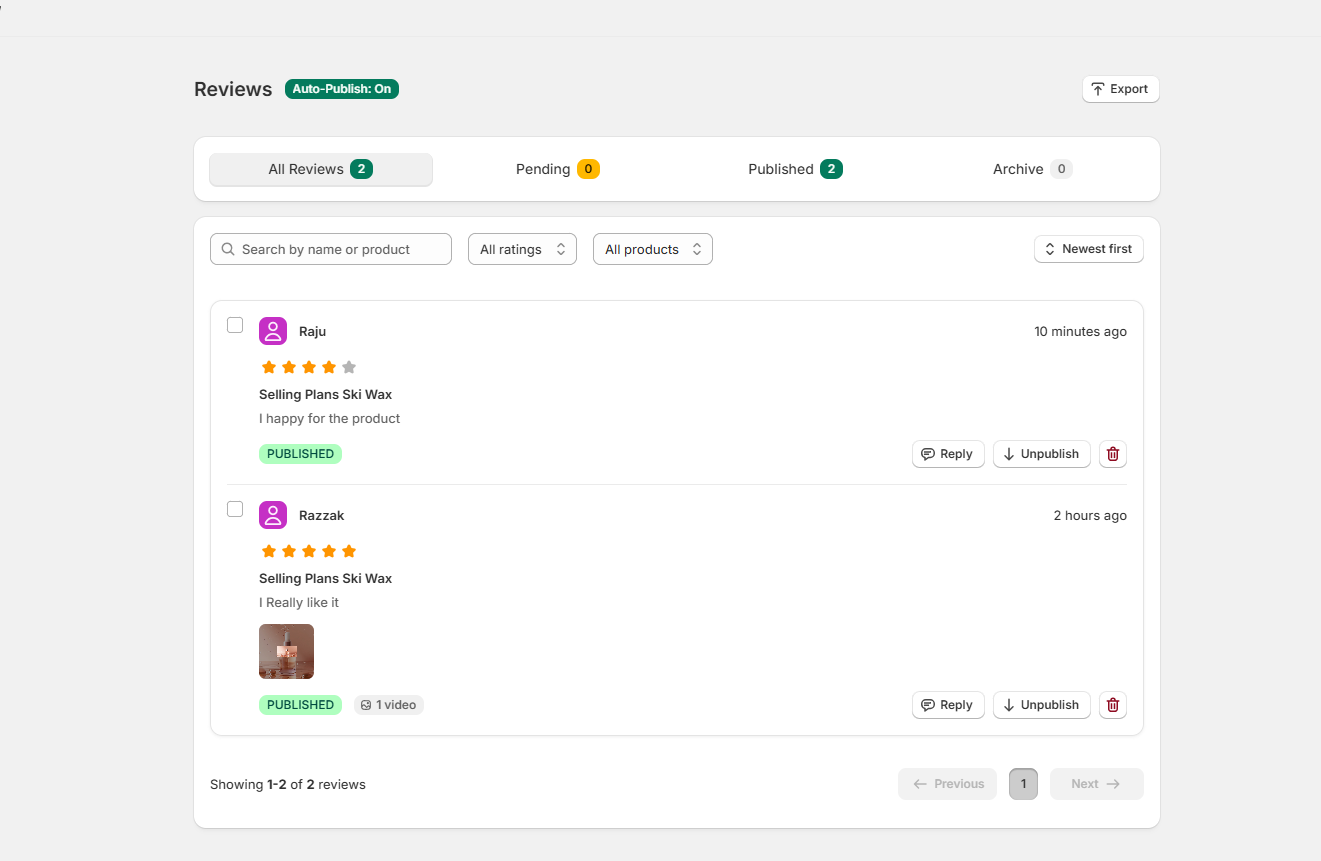
Dashboard Overview
- Auto-Publish Status: Shows whether auto-publishing is active (Auto-Publish: On), automatically displaying incoming customer reviews on your storefront.
- Export: Allows you to export your store's customer review data into a downloadable spreadsheet file.
- Filter Tabs — categorizes customer feedback by approval status
- All Reviews: Displays total reviews submitted to your store.
- Pending: Shows customer reviews currently awaiting moderation.
- Published: Lists reviews currently live on your storefront.
- Archive: Contains archived or hidden review entries.
- Search & Filters: Find specific reviews using the search bar (by customer name or product review) or filter by rating score, product type, and date sorting (e.g., Newest first).
- Review Card Actions — manage individual customer entries
- Reply: Send a response to a customer's review.
- Unpublish: Remove a review from the live storefront.
- Delete (Trash Icon): Permanently remove the review entry.